Known limitations
These are limits rather than bugs — things KeyPressOSD does not do, with the reason it does not. They are listed because a limitation you can read about is a great deal less frustrating than one you have to discover.
Elevated windows show nothing
While the focused window belongs to a process running at higher integrity than KeyPressOSD — anything started as administrator — no keystrokes appear.
This is Windows working correctly, not a fault. A low-level keyboard hook in a non-elevated process is not given input destined for an elevated window, because that is exactly how a keylogger would read an administrator's password.
You will notice this most with:
- Task Manager, Registry Editor, and the elevated parts of Settings.
- An editor or terminal you opened as administrator.
- Third-party utilities that run elevated.
The UAC prompt itself and the lock screen are further out of reach still: they run on a separate desktop, and no elevation reaches those.
Running KeyPressOSD as administrator
The fix is to put KeyPressOSD at the same level, and Always Run as Administrator in the tray menu is how. Windows asks for consent, the old instance stands down, and the new one takes over — the tray icon does not move and nothing is lost but whatever was on screen at the time.
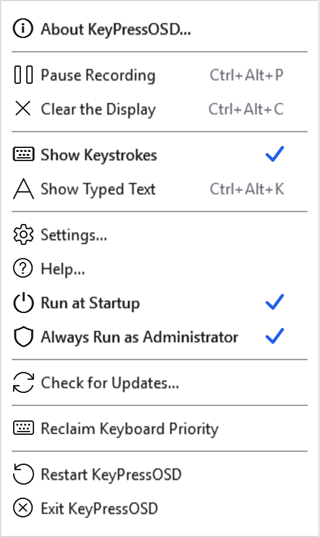
The tray menu in an elevated copy. The tick reports the setting, and the menu is the one place that can be misread — hover the tray icon or read the System tab for what the copy in front of you actually is.
The row stays ticked afterwards, and it is worth being precise about what that tick means: the setting is on, not necessarily this copy. It is the sign-in task that starts an elevated copy, so a copy you launch yourself — from a shortcut, from Explorer, from a search box — comes up as an ordinary program with the row still ticked. To see what the copy in front of you actually is, hover the tray icon, which says "administrator" when it is, or read the first line of the System tab. When the two differ the menu offers Restart as Administrator, and that row is there only then.
That one prompt also arranges every later start. The new instance registers a sign-in task set to run with the highest privileges, and Windows starts such a task without asking — which is the only way an elevated program can start silently at sign-in. A shortcut or a registry entry cannot: those prompt every single time, which is no way to start something automatically.
Untick it to remove the task. That takes effect at your next sign-in rather than immediately, because a program cannot give up rights it already holds and Windows has no counterpart to "run as administrator" for going the other way. Exiting and starting KeyPressOSD again does it now.
Two things about that second one are easy to be surprised by, so they are worth saying here:
- It takes effect next time. Ticking it changes nothing about the instance you ticked it in. Use the tray menu if you want it now.
- Windows asks every time. There is no way for an unprivileged program to arrange silent elevation, so if Start KeyPressOSD when I sign in is also on you will get a consent prompt at every sign-in. For occasional use — you are about to demonstrate something in Task Manager — the tray menu is the better answer, and it leaves nothing behind.
This is a real trade rather than a free upgrade. The integrity check that hides elevated windows from KeyPressOSD is the same check that stops any ordinary program reading what you type into an administrator's console, and running elevated is giving that up for this application. Nothing else about it changes: an elevated instance still writes no keystroke to disk and still injects nothing. It is off by default, and most people never need it.
Print Screen does not appear
Pressing Print Screen produces no entry on the machines this has been tested on.
What has been ruled out: the key is not remapped to the Snipping Tool, there is no scan-code remapping in the registry, the display path names the key correctly (it is Print Screen, and there are tests holding that), and an injected Print Screen produces both a key-down and a key-up at the hook — so the "only reports a release" theory is wrong at least for injected input.
What has not been established is what a physical press produces on a given keyboard. If Print Screen matters to you, it is worth reporting what keyboard you have.
A graphics failure restarts it rather than being ridden out
If the display driver hands back a broken display — which happens on some machines when resuming from sleep — the window this application draws into can fail outright. KeyPressOSD cannot repair that in place: it writes the failure to its log and starts a fresh copy instead.
The tray icon comes back by itself within a few seconds. What is lost is whatever was on screen at the time, and the paused state if you had paused it. See Troubleshooting for the log and what it records.
One display, not one per monitor
There is a single panel. Set to follow the active window it moves between monitors with your focus, but it is never in two places at once.
Mouse movement and drags are not shown
Clicks are shown, releases are not — so a drag appears as its initial press. Showing both would double every entry for no extra information.
Mouse movement is not shown at all, and would not be useful at this size.

What the mouse contributes: the button that went down, and the wheel. The press is there; the release that followed it is not.
No text-expansion, no remapping, no macros
KeyPressOSD observes input and never injects any. Anything that would require injecting — expanding an abbreviation, remapping a key, replaying a macro — is out of scope by design rather than by omission.
That boundary is what lets the privacy statements in this manual be unconditional.
It does not update itself
Check for Updates tells you a newer release exists and offers to open the page. It does not download or install anything.
Replacing a running executable needs elevation for an installed copy and a signature to be worth trusting, and this application has neither.
No installer
Releases are ZIP archives. KeyPressOSD is portable — it keeps its settings beside the executable — so an installer would add a step and take away the property that makes it easy to try and easy to remove.