KeyPressOSD
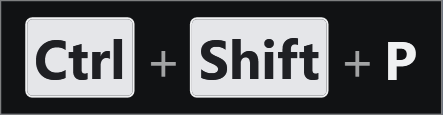
KeyPressOSD shows what you press at a size you can actually read. It is meant for screencasts and presentations, and for anyone who would rather not squint at a text field to see what they just typed. Pressable things are drawn as key caps and typed text as plain text. That one distinction makes the display readable at a glance, and the high contrast stays sharp on a projector and through a compressed screen recording.
There are two modes. Keystrokes names each key as it is
pressed: Ctrl+Shift+P, F5, Left Click.
Typing shows the words instead, on one line that never wraps,
with a caret that follows your arrow keys. It is correct on any keyboard
layout, because key names come from the layout of the window you are typing
into, so AltGr, dead keys and non-US layouts all read correctly.
- Chords read the way Windows writes them, with modifiers in a fixed order
- Repeats collapse into a count:
Backspace x7,Alt+Tab x3 - Key names as words, keycap symbols, or symbols for every key
- Follows the foreground monitor, and stays correct across mixed-DPI displays
- Click-through: never takes focus, absent from Alt+Tab and the taskbar
- Nothing you type is written to disk or sent anywhere
Comments
Sign in with GitHub to leave a comment or reaction.