Tools I've Built

Over the years I've channelled countless hours of curiosity and frustration into tools that actually solve real problems. Every project here began as a personal itch — something missing from my daily workflow — and grew into a polished, shareable solution. Browse the highlights below. Everything here is free. A few are open source on GitHub; the rest are free downloads whose source is private.

Native Desktop Tools

Windows Application

AltTab

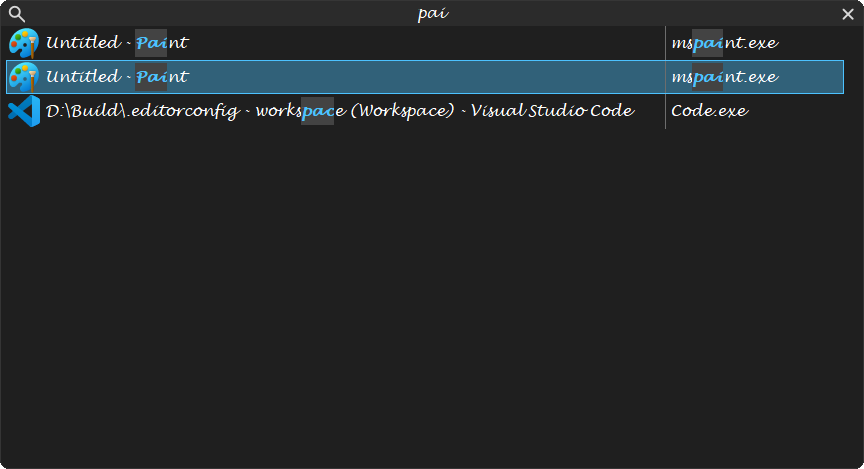
A lightweight replacement for the Windows task switcher, written in C++ and the Win32 API. Hold Alt, tap Tab, and type to filter every open window with fuzzy matching, then switch, close or terminate without leaving the keyboard.

  • Fuzzy search filtering across all open windows, no exact title needed
  • Alt + ` to cycle the windows of the same application
  • Thirty-one built-in themes, and every hotkey can be re-recorded
C++ Win32 API Fuzzy Search
Free download MIT licence
Read more
The AltTab switcher filtering its window list as you type
Windows Application

PasteJump

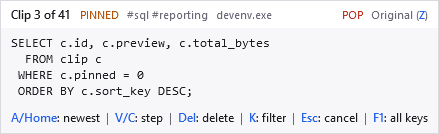
A jog wheel for your clipboard. Hold Ctrl, tap V to walk back through what you copied, and let go to paste it. The clip appears beside the caret, so your hand never leaves the keyboard and nothing steals focus.

  • The Clipjump gesture, reimplemented and extended
  • A clip stack for pasting and a searchable history, kept apart
  • Join several clips into a single paste
C# .NET 10 WPF
Free download Freeware
Read more
The PasteJump overlay during the gesture, showing clip 3 of 41
Windows Application

PerchBar

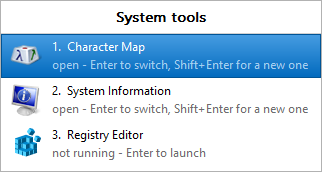
One taskbar button for several apps, including the ones already running, however you started them. Pin a group, click it to switch to or launch any member, and anything you start some other way joins the group's button by itself.

  • Adopts windows that are already running, which launchers cannot do
  • Instant, flicker-free, and it survives an Explorer restart
  • One executable, with no installer and no service
C++20 Win32 API Windows Shell
Free download Freeware
Read more
A PerchBar group's view, listing which members are open and which are not running
Windows Application

KeyPressOSD

An on-screen display for keys and mouse buttons, at a size you can read across a room. It is built for screencasts and presentations, and is correct on any keyboard layout.

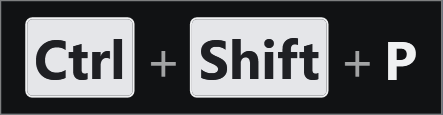
  • Keystrokes mode names each chord; Typing mode shows the words on one line
  • Repeats collapse into a count, such as Alt+Tab x3
  • Click-through, never takes focus, and writes nothing you type to disk
C# .NET 10 WPF
Beta MIT licence
Read more
Ctrl + Shift + P on the KeyPressOSD overlay

Extensions & Plugins

Ports: good extensions kept alive

Extensions written by others for older Visual Studio versions, ported and published for current ones.

VS 2022 Port

IntelliCommand

Hold Ctrl, Shift or Alt, or any combination, for two seconds and it lists every shortcut that starts that way. Press the first half of a chord, such as Ctrl+K, and it shows what can follow. Originally by Den Gladkikh and colleagues on the Visual Studio team, for VS 2010 to 2013.

C# VSIX VS 2022
1,900+ installs MS-PL
VS 2019 & 2022 Port

GradientSelection

Draws the editor's text selection with a gradient brush, the way it looked in Visual Studio 2010 Beta 1. Originally by Noah Richards, for Visual Studio 2015 and earlier.

C# VSIX VS 2019 & 2022
240+ installs Free

Want to see more?

These are just the highlights. My GitHub profile has the repositories that are public, such as GoToRecentFile, OpenFileInSolution and the two ports, where you can browse the source, open issues, or contribute. The four Windows applications, DependencyGraph, PresentationAssistant and CommandPalette are not among them: they are free downloads, but their source is private.

Comments

Sign in with GitHub to leave a comment or reaction.