DependencyGraph
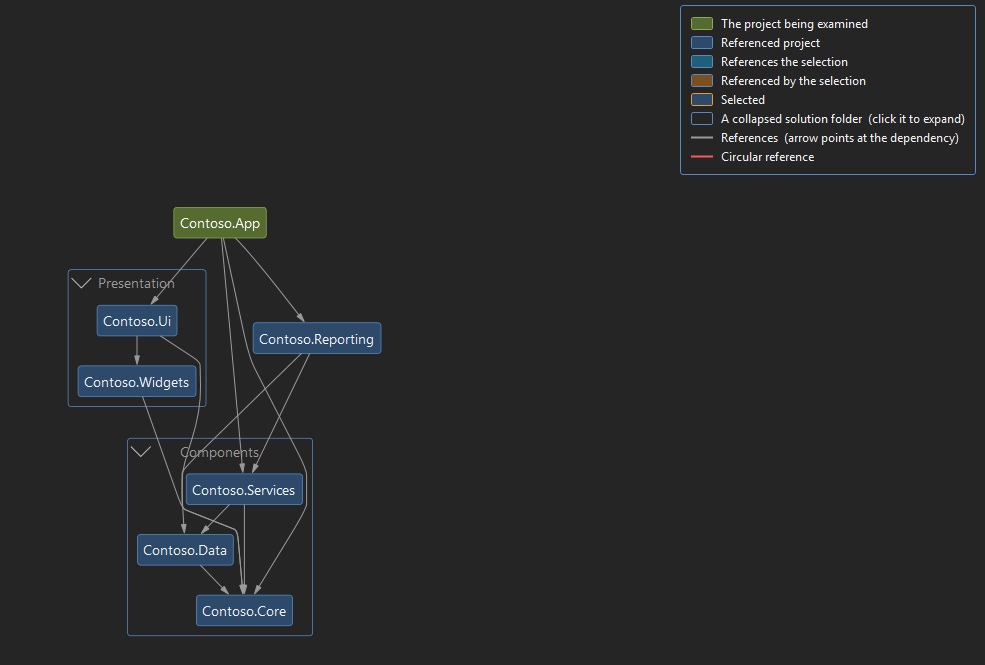
DependencyGraph draws one box per project and one arrow per reference, in a tool window that docks beside your code. Use it to work out what a project actually drags in, why a build takes so long, whether a reference can go, or where a circular reference crept in.
Visual Studio's own Code Map needs the Enterprise edition to create a graph. DependencyGraph works in Community and Professional too, and needs no setup: no Graphviz, no DGML editor. Open it from Tools → Show Dependency Graph, or by right-clicking a project in Solution Explorer.
- Five views, including an impact view of everything that depends on a project
- Depth limits, focus on chosen projects, and solution folders as collapsible groups
- Circular references drawn in red, naming the projects the build error does not
- Drag nodes where you want them, and the layout is remembered per solution
- Export to PNG, DGML or Graphviz DOT, for one project or the whole solution
- Follows your Visual Studio theme, light or dark
Comments
Sign in with GitHub to leave a comment or reaction.